The multi-project IDE
The development workspace built for the AI era.
Many projects, many branches, many agents, all on one calm, fast surface.
Run Claude Code, Codex, and Gemini in parallel — with GitHub Copilot in AI Chat
Launch multiple AI coding agents concurrently in isolated Git worktrees. Track task states centrally, review diffs as they happen, and merge clean changes without locking your active workspace.
- ✓Isolated Git worktrees per task
- ✓Multi-model task orchestration
- ✓Live diff reviews before merging
Manage multiple branches without switching IDE windows
Transform Git worktrees into fully initialized, runnable environments. Terminals, tests, browser previews, and environment files automatically bind to each branch with zero stashing.
- ✓Zero branch stashing or switching delays
- ✓Automatic copying of untracked .env files
- ✓Dedicated terminals and watchers per worktree
Work across multiple Git repos in one unified workspace
Connect frontend, microservices, backend APIs, and shared libraries under a single project root. Search symbols across projects, run shared launch scripts, and track multi-repo status at a glance.
- ✓Project groups and root repo discovery
- ✓Cross-project symbol and text search
- ✓Unified multi-repo Git matrix
Broadcast commands across repositories simultaneously
Execute terminal commands, package manager scripts, and test suites across multiple repositories at once. Mirror interactive keystrokes across terminal tiles and let AI triage failed runs.
- ✓Parallel command fan-out with dynamic tokens
- ✓Live keystroke mirroring across terminal tiles
- ✓One-click AI error triage for failed commands
Monitor GitHub Actions and GitLab CI/CD in your editor
Track workflow runs, stream live job logs, review pull request checks, and let AI agents diagnose broken builds without leaving your code or switching to browser tabs.
- ✓Native GitHub Actions and GitLab CI integration
- ✓Live job log streaming and stage indicators
- ✓AI build failure diagnosis and code fixes
Debug web applications with live DOM and console evidence
Give coding agents direct access to Flame's internal browser. Inspect rendered HTML, capture console logs and network failures, take viewport screenshots, and verify visual fixes in place.
- ✓Internal browser with built-in developer tools
- ✓DOM, network, and console context capture for AI
- ✓Side-by-side visual comparison and regression checks
Connect Jira tickets and launch AI coding agents in one click
Sync assigned Jira issues into a dedicated editor panel. Inspect issue context, acceptance criteria, and comments, then launch an AI agent on an auto-named worktree branch with one click.
- ✓In-editor Jira ticket sync and board filters
- ✓Automated branch and isolated worktree creation
- ✓Transition ticket statuses and open pull requests
Test REST and GraphQL endpoints right beside your code
Craft HTTP requests, manage hierarchical environment variables, import cURL commands with one click, inspect headers and payloads, and let AI agents validate backend routes automatically.
- ✓Full REST and GraphQL request workbench
- ✓One-click cURL and collection import
- ✓AI agent tools to execute and assert API routes
Query SQL, MongoDB, and Redis targets in one workspace
Connect to 28 database targets across relational, document, and key-value systems. Browse schemas, run queries, edit supported table data inline, and attach schema context directly to AI prompts.
- ✓28 database targets (PostgreSQL, MySQL, Mongo, Redis, SQLite)
- ✓Inline editable data grids for supported tables
- ✓Direct schema context handoff to AI coding agents
Understand and resolve Git conflicts with AI guidance
Inspect conflicting hunks in an intuitive 3-pane merge editor. Understand branch intent with AI explanations, and automatically resolve package.json dependencies and lockfiles for npm, Yarn, pnpm, and Bun.
- ✓Interactive 3-pane visual merge editor
- ✓Automatic package.json lockfile regeneration
- ✓Intent-aware AI conflict analysis and resolution
Run and debug full microservice stacks in one workspace
Operate multi-repo architectures with unified launch configurations, Docker Compose containers, real-time CPU and memory stats, log streams, and cross-project command orchestration.
- ✓Docker and Compose fleet management with stats
- ✓Unified multi-service stack launch recipes
- ✓Aggregated container logs and interactive terminals
Edit raster images and vector SVGs directly inside your IDE
Resize, crop, and optimize PNG, JPEG, and WebP assets with file size controls. Edit SVG vector paths, anchor points, and curves visually, or switch to source markup without leaving your Git workflow.
- ✓Linked aspect ratio resize and compression sliders
- ✓Visual vector path, anchor, and curve editing
- ✓In-repo Git review for image and vector changes
Browse project files like a desktop file manager
Open any directory as a visual workspace with list, details, grid, and preview layouts. Manage multi-file selections, inspect documents and archives, and play media without leaving your IDE.
- ✓Rich previews for code, images, fonts, documents, and media
- ✓Marquee selection with shared desktop copy and paste
- ✓Direct handoff to archive, database, and document viewers
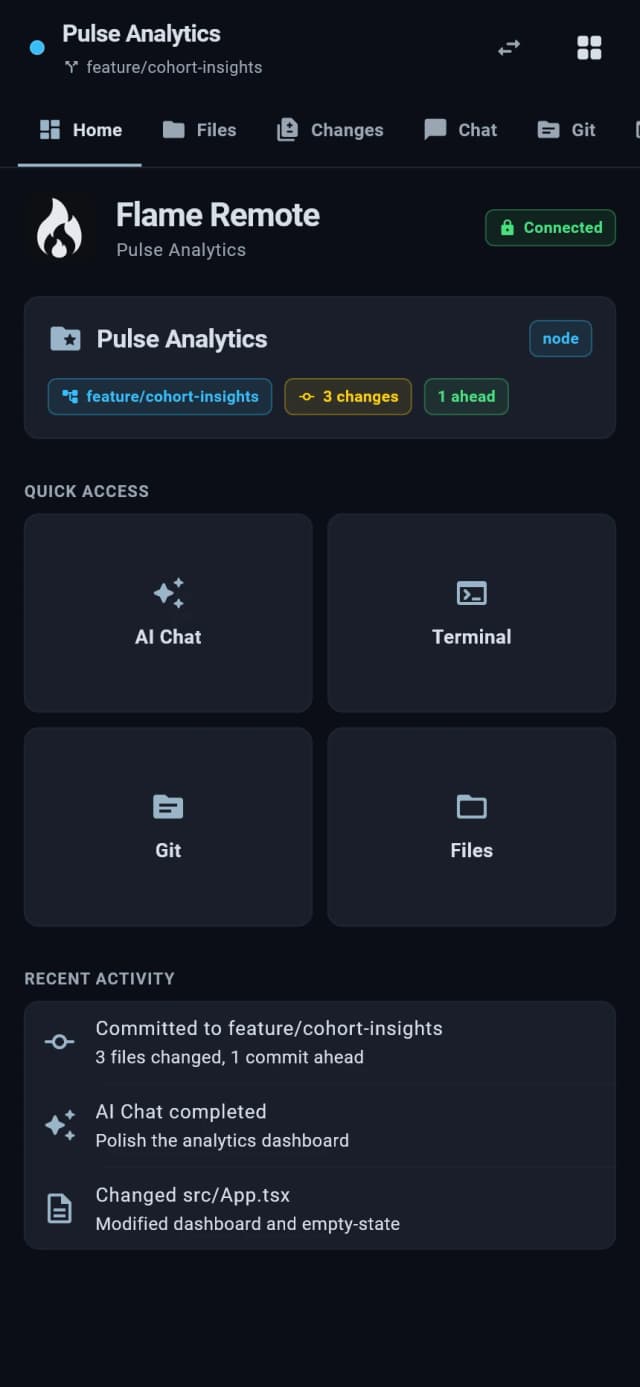
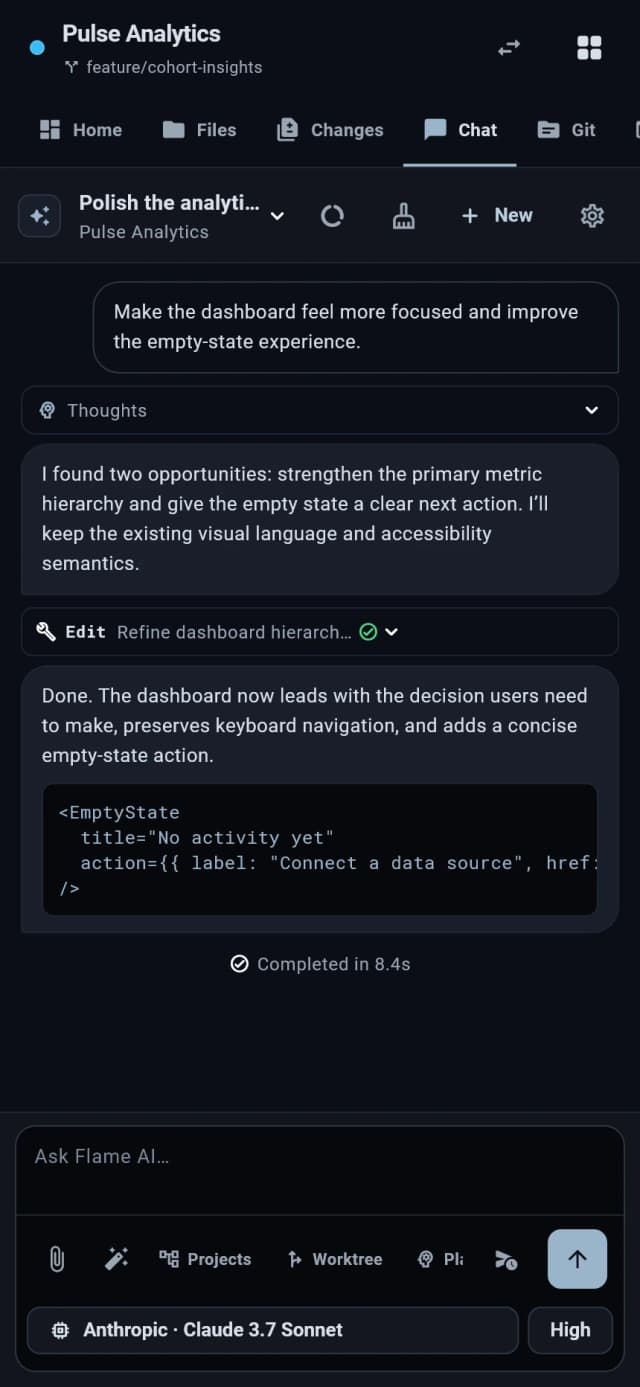
Control your development machine from your phone
Access project files, AI chat, Git status, agent approvals, and a real terminal from your phone browser via end-to-end encrypted Secure Relay. Dedicated native apps will also be available soon for iOS and Android.
- ✓End-to-end encrypted relay with loopback host server
- ✓Review diffs and approve AI actions on the go
- ✓Native iOS and Android apps coming soon
Code on remote hosts, cloud instances, and VMs over SSH
Run Flame's backend directly on your remote host. Get native-speed file editing, instant terminal response, and zero-lag symbol indexing with ~/.ssh/config inheritance, bastion jump support, and remote AI agents.
- ✓Client-server model with encrypted loopback auth
- ✓Automatic ~/.ssh/config and ProxyJump bastion support
- ✓Offload parallel AI agent builds to cloud compute
Search all your projects from one place with warm symbol indexing
Search across every open repository and project group simultaneously. Query functions, classes, and types with a warm lexical symbol index that works instantly without waiting for language servers to boot.
- ✓Ripgrep-speed search across all projects in parallel
- ✓Warm lexical workspace symbol index (# and @ modes)
- ✓Instant cross-repository jump to declaration
1-click debugging, CPU flamegraphs, and AI error diagnosis
Debug and profile code with zero manual launch configuration. Set gutter breakpoints, inspect scoped variables and Monaco inline values, capture zoomable CPU flamegraphs, and let AI agents diagnose bugs.
- ✓1-click launch with zero manual launch.json setup
- ✓Monaco inline values and scoped variable inspection
- ✓Canvas CPU flamegraphs and AI performance optimization
Bring the whole stack into focus.
Download Flame IDE and build with projects, worktrees, and reviewable AI assistance.
Free to use on macOS, Windows, and Linux.